 |
|
|
|
|
|||
|
PlotCalc.com: 17.04.2024 The server performance has been slightly increased for more comfortable operation ... [more..]
|
Installing PlotCalc 2023.13.13 User agreement and refund conditions
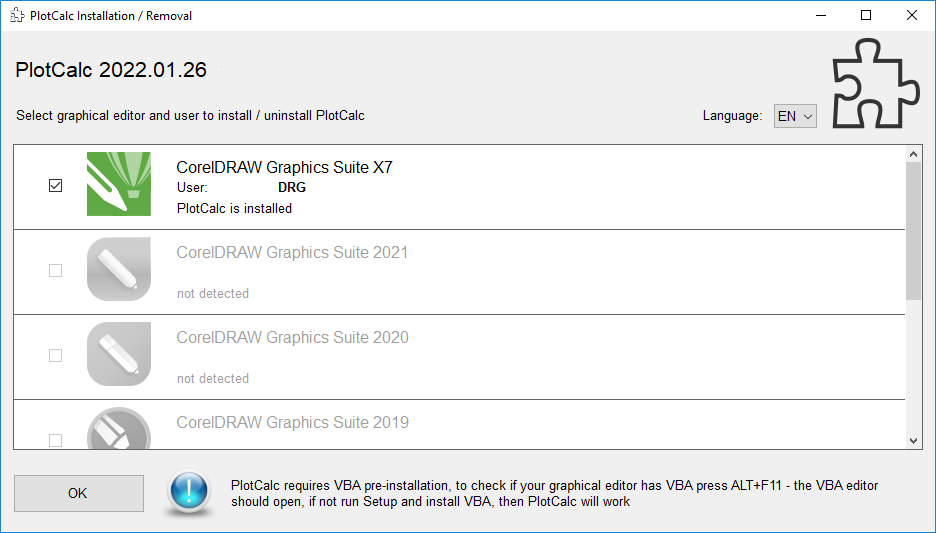
Supported versions of graphics editors CorelDRAW 2023, 2022, 2021, 2020, 2019, 2018, 2017, X8, X7 (64/32 bit) Corel DESIGNER (not supported) Automatic installation / removal
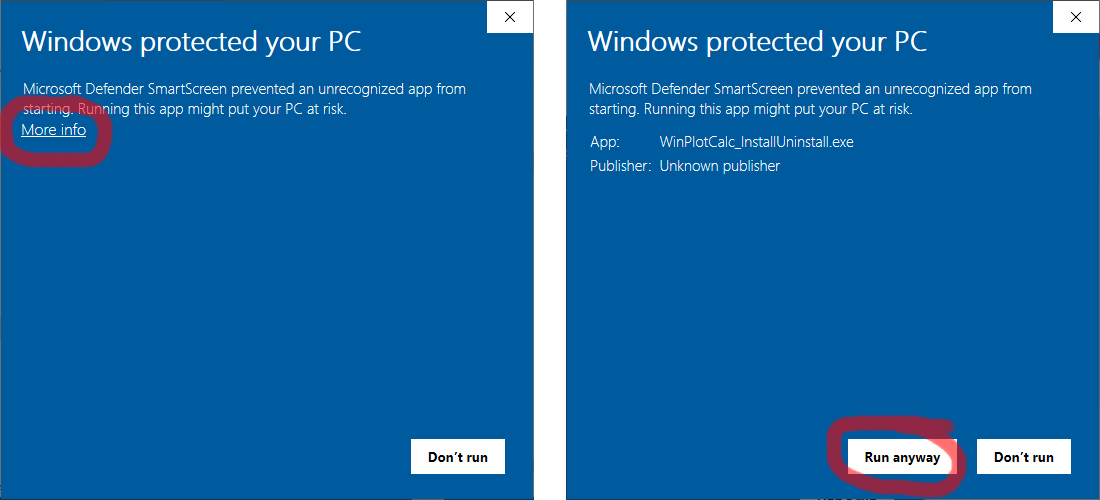
Language packs: English, Chinese, Polish, Ukrainian, German, Russian, French, Slovak, Slovenian, Italian, Vietnamese, Kazakh, Portuguese (Brazil), Turkish, Spanish, Indonesian, Arabic, Hindi Warning! If the Windows system "complains" when trying to start the PlotCalc installer that it does not have a publisher certificate, please do as shown below: click on "More info", then click on "Run anyway"
Manual installation / removal
|
||||||||||||||||||||||||||||||||||||||||||
|
|||||||||||||||||||||||||||||||||||||||||||




 PlotCalc 2023.13.13
  MacOS not supported